
TLDR: AgentOps is where our Offensive Security team shares agents and skills. We use it to see what happened during a run, test changes on new runs, and publish versions the rest of the team can install.
When an Offensive Security team starts using agents across several projects, the setups can drift. One tester changes a skill, another keeps an older copy, and a useful fix may never reach the rest of the team. Two people can end up using the same agent name with different instructions.
A failed run brings another problem. From the final answer alone, it can be hard to tell whether the agent missed a step, used the wrong account, or ran into a tool error. Changing the instructions and trying again gives us another answer, but we still need a way to compare what happened and check whether the change helped.
That's why we built AgentOps. It gives our team a shared catalog and a record of runs we can use when testing a change. Once a new version passes the required checks and we've reviewed it, we can publish it for teammates to install. A fix can then reach the next pentest without everyone having to copy and maintain it themselves.
We'll use webapp-pentester, one of the capabilities in our catalog, for the examples below. The agent does the work in OpenCode. AgentOps handles its packages, session records, and evaluations. We're changing the agent's instructions and tools. We aren't training the model itself.
Sharing agents and skills
We call each package a capability. It contains an agent, its skills, and the other files it needs. A package can also include more agents or tools. AgentOps checks the package and its hash, called a digest, then signs the release details. A published version stays fixed.
The catalog shows what's available and what each version contains.
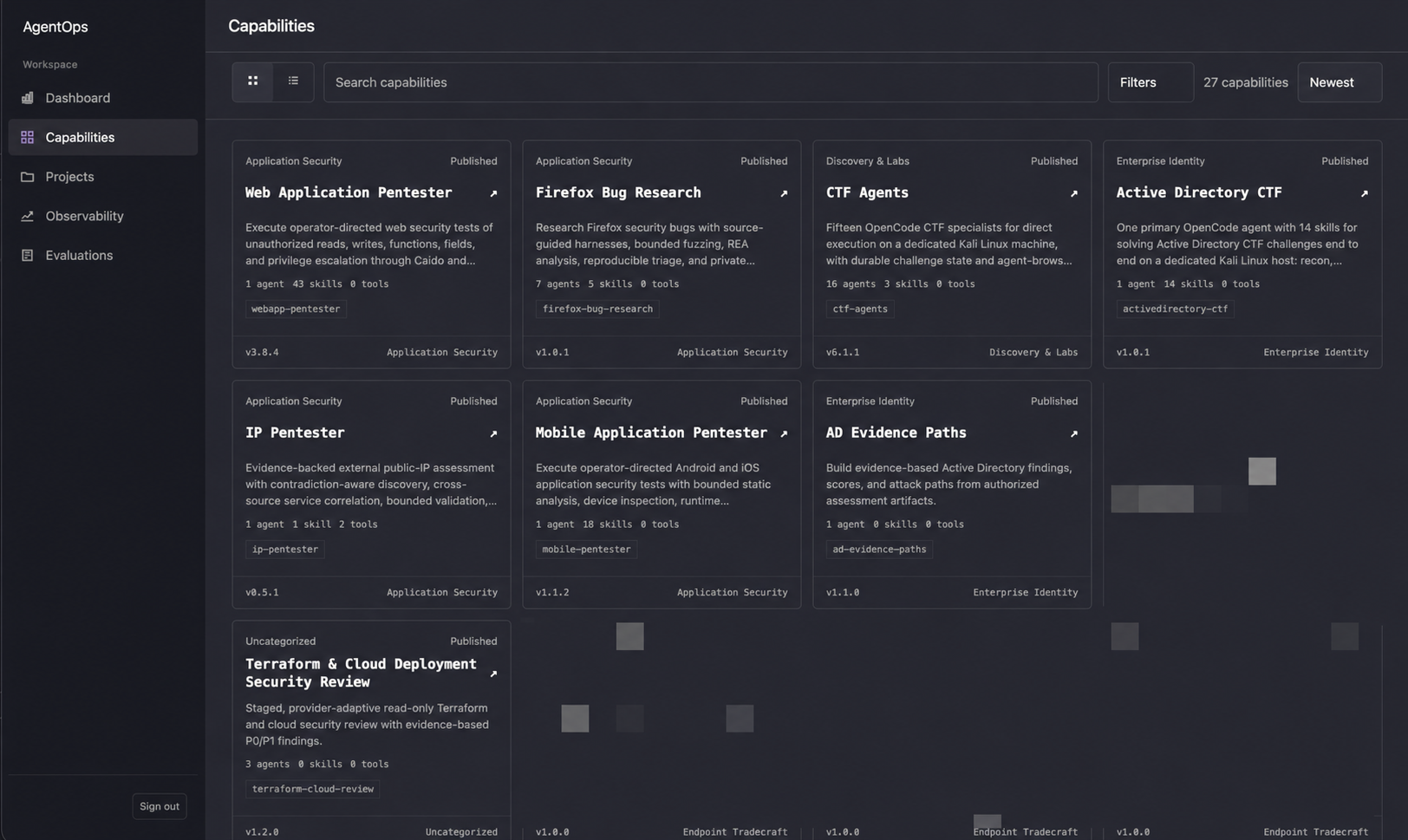
Published capabilities in the AgentOps catalog.
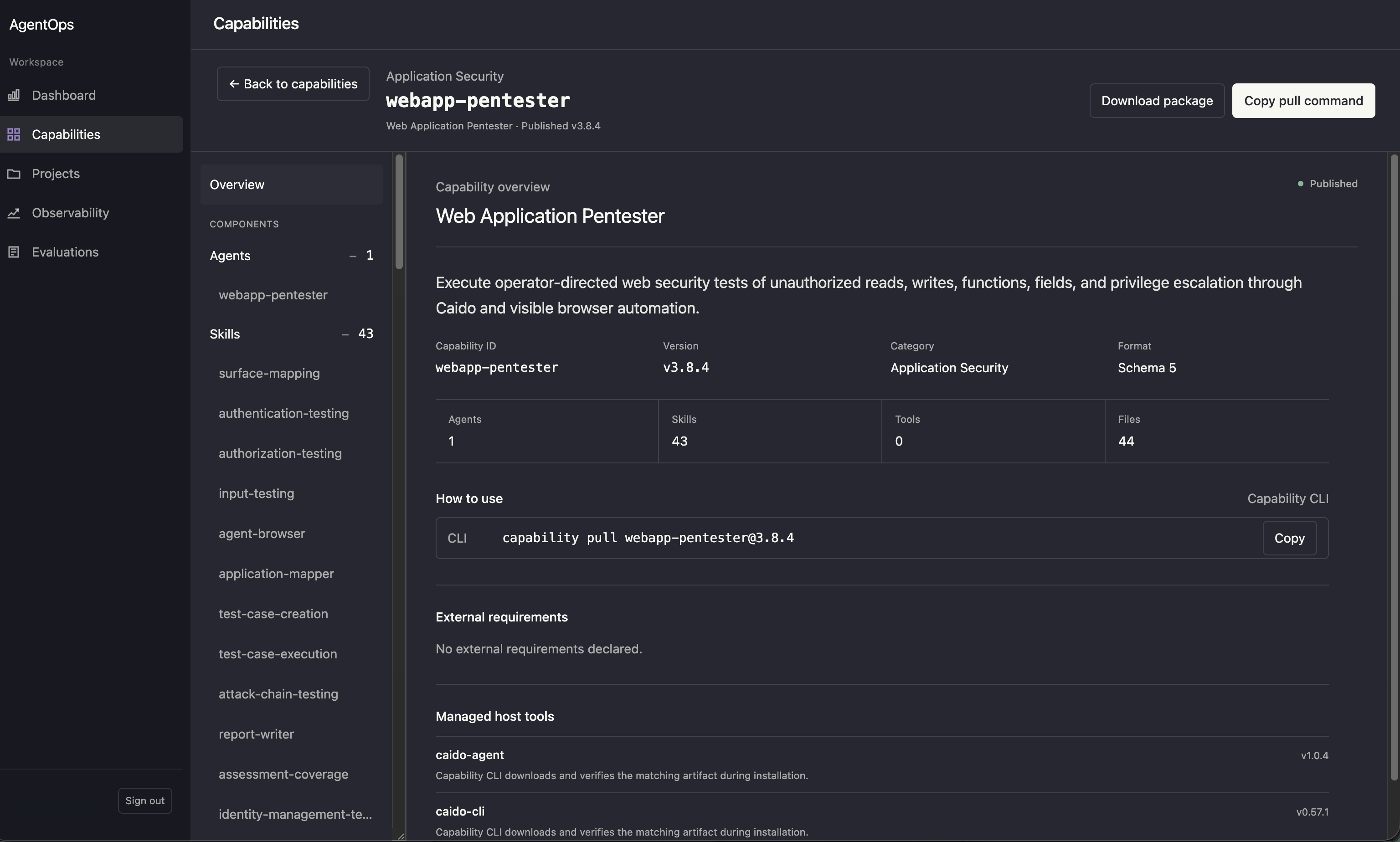
The webapp-pentester entry, with its skills and install command.
We use the AgentOps CLI to install a version into an OpenCode project. We can update it later or roll back to an older version. A local lockfile lists the installed files, version, and package digest. A local edit doesn't change everyone else's setup. We publish a new release, and each project chooses when to install it.
For example, we can put a fix for session handling in a shared skill. Teammates get it when they install the new release. They start with the same instructions, and we have a version to refer to when comparing runs.
Connecting the agent to AgentOps
The AgentOps CLI gives the agent a way to use the platform from its own workspace. It can find and install shared capabilities, submit a completed run for evaluation, and read the results. We can ask the agent to act on that feedback without copying it from the dashboard into a chat.
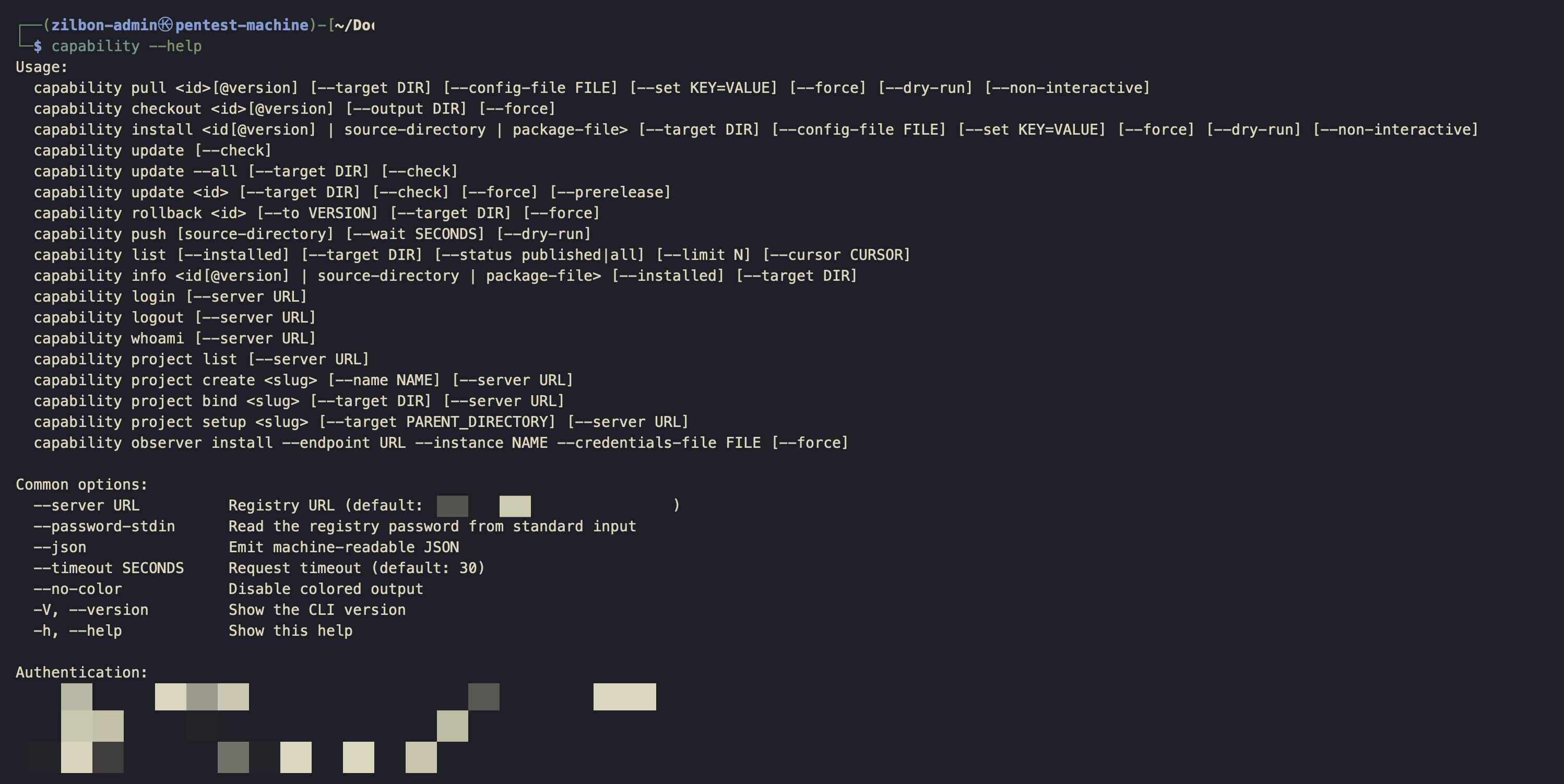
The AgentOps CLI, used by testers and agents to work with the platform.
For example, we can ask it to use an evaluation to update a skill and upload a draft for testing. After testing the draft, we review the results and decide whether to publish it. A useful change can become a version another teammate can install.
This is also useful for standardisation. We can put those steps into a shared skill and reuse them across pentests. Everyone works with the same interface and the same process for proposing improvements, even when they are working on different projects.
An example from web testing
We give webapp-pentester the objective, targets, accounts, and exclusions. It loads the skills it needs for the task. For a broad assessment, mapping the application, writing test cases, and running them are separate tasks. If we discover more endpoints or can't finish a test, we revisit them in the next pass.
The map, cases, and results stay in workspace files. Another tester can read them to see what's done and what's still blocked.
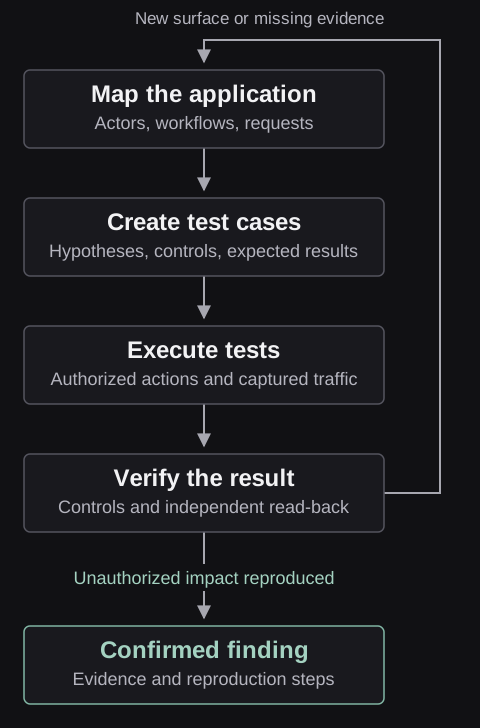
Take a hypothetical authorization test. An account with limited permissions sends an update and gets 200 OK. The agent needs to check which account sent the request and whether the protected field actually changed. It also needs a working baseline and a control request so we can tell an authorization issue from a broken test. An expired session or an unclear permission rule leaves the case unresolved.
If a tester finds a gap in those instructions, we can change the skill and test it again. Once we publish the update, the next teammate can install it.
Looking at a run
Before starting OpenCode, we link the workspace to an AgentOps project. The observer collects activity from OpenCode and sends it to AgentOps.
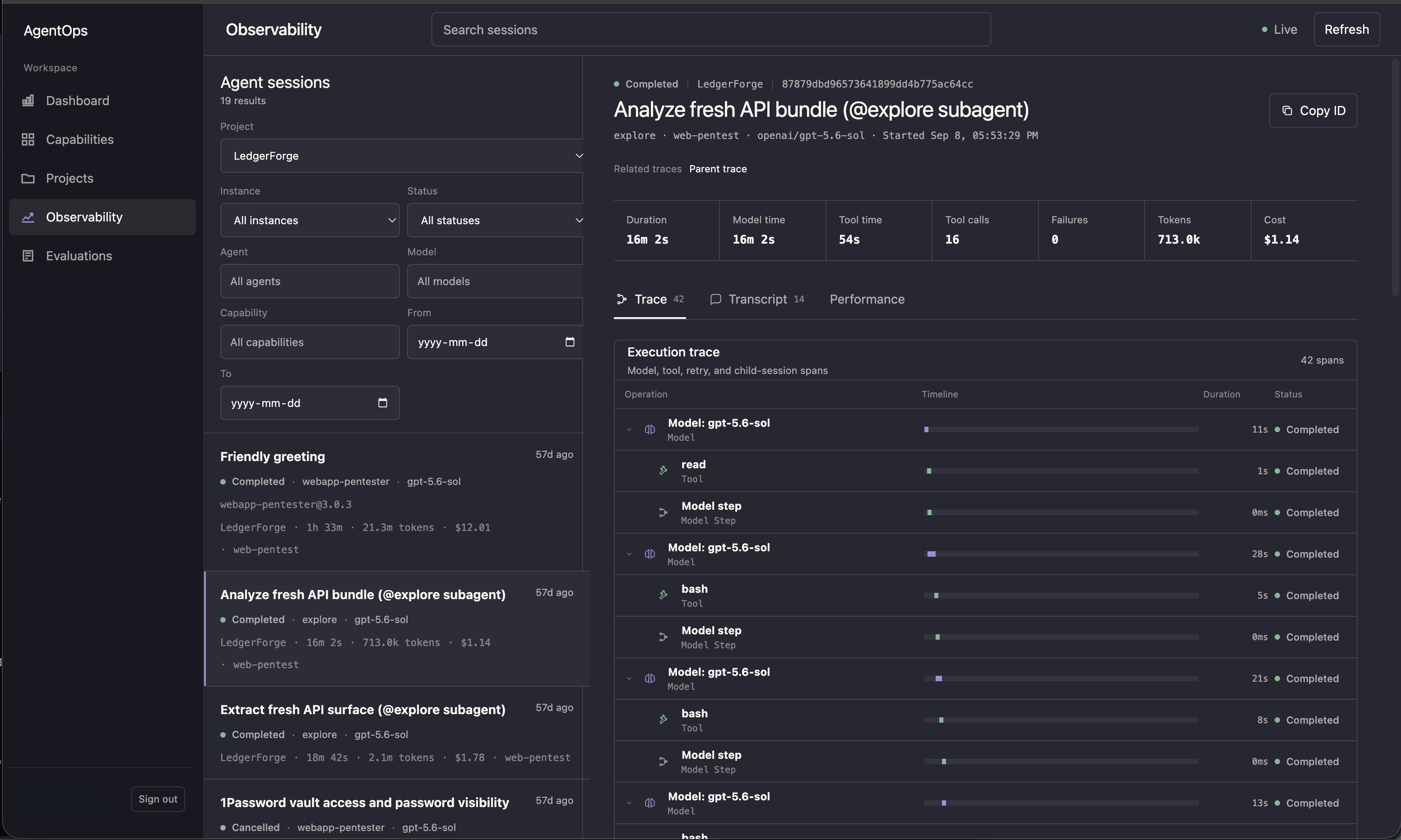
The session view shows model and tool activity. We can also follow a subagent back to its parent.
The Trace view shows model calls, tool calls, retries, and child sessions. The Transcript includes loaded skills, shell activity, and compaction notices. We can also see time spent, token usage, failures, and cost when it's available. Model and tool time can add up to more than the elapsed time because some work runs in parallel.
When a run goes wrong, we can look for a missing skill, a failed tool call, or an unexpected account switch. We can also compare the final answer with the actions recorded in the trace.
The observer only records live events. If its event subscription disconnects, it cannot recover what it missed. AgentOps marks known gaps as incomplete. Even without a gap marker, we can't assume the whole run was captured.
Testing a change
If the agent sent an update but never checked whether it worked, we'd change the authorization skill and test it again:
- Read the trace and check the target to understand what the agent missed.
- Update the skill and save a draft, called a candidate in AgentOps.
- Install the candidate in a separate workspace linked to the AgentOps project.
- Run a fresh authorized test with the updated skill.
- Run the selected evaluation checks on the new session.
- Review the results and publish the candidate if the required checks pass.
AgentOps keeps a fixed copy of the session for each evaluation. Checks can look for text, numbers, or tool calls in that record. A model can also review it as a judge. If there is a known gap in the recording, AgentOps skips that model review and shows the gap with the results.
In our example, the trace shows that the agent sent the update request. We check the target to see whether the update actually worked.
Before publishing, every session included in the evaluation must pass the required checks. We run the evaluation in AgentOps using fresh sessions recorded with the candidate's package digest. Running checks on an old session can't tell us whether the updated skill works better.
Why we use it
We want useful fixes to reach the rest of the team. AgentOps gives our Offensive Security team a shared set of versions to work from, with a way to review runs and choose when to update. We haven't measured whether this leads to more findings or faster assessments.